
NaruBase™
NaruBase™ Cloud
One desktop console for every cloud you use
NaruBase™ Cloud is a desktop application that consolidates server management across Vultr, DigitalOcean, Hetzner, and Linode into a single interface. One server list, one terminal, one AI assistant — your credentials stay in the OS keychain, your AI keys stay on your machine.
Download the latest build from GitHub Releases. Install, try it free for 7 days, then enter your license to keep using it. Windows may show a SmartScreen warning on install — click "More info" then "Run anyway" to continue; this is normal for a small publisher and doesn't mean anything is wrong with the file.
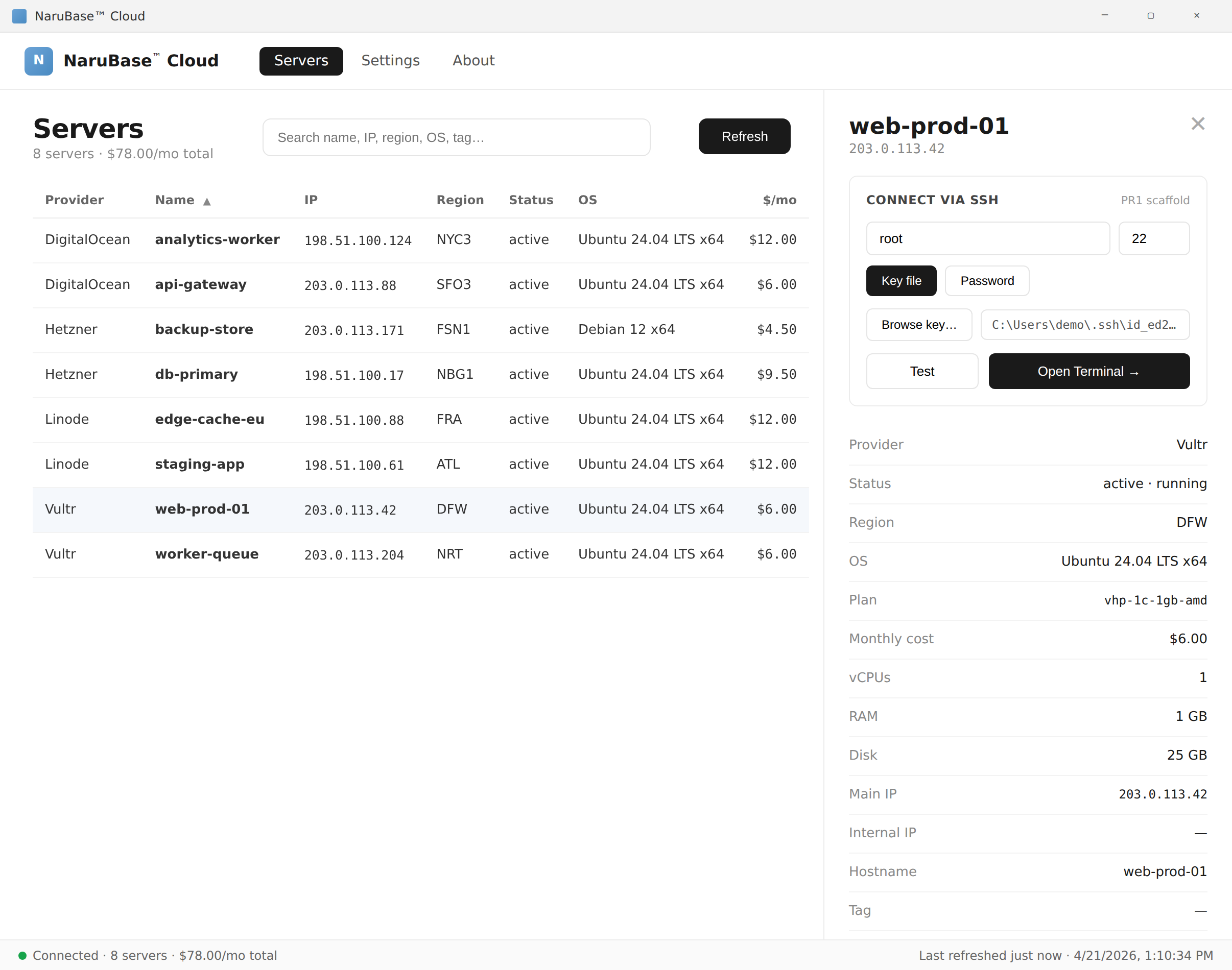
1. One list for every provider
Connect as many accounts as you want across Vultr, DigitalOcean, Hetzner, and Linode and see every server in a single list — IP, region, status, instance type, tags. No more four-tab dashboards, no more logging in and out to check a detail on a box you spun up six months ago.
2. SSH terminal with a local AI copilot
Open an integrated SSH session on any listed server with one click. A sidebar AI assistant watches what you're doing and suggests diagnostic commands; commands never run without your explicit approval. Bring your own API key for Claude, GPT, or Gemini — the key lives on your machine and requests go directly from your machine to the provider, never through us.
3. Credentials never leave the device
Cloud provider credentials are stored in the operating system keychain (Windows Credential Manager / macOS Keychain / libsecret on Linux) and only decrypted in-process when needed. AI API keys follow the same pattern. NaruBase™ has no backend that sees your keys; the app would still work if our servers disappeared tomorrow.
4. Pricing and licensing
$39 one-time per user, with a 7-day free trial. Currently ships for Windows; macOS and Linux builds are planned.
7-day free trial. No subscription, no recurring fees.
Frequently asked questions
Which cloud providers does NaruBase™ Cloud support?+
Vultr, DigitalOcean, Hetzner, and Linode today, all from one desktop console.
Where are my cloud credentials stored?+
In your operating system's keychain (Windows Credential Manager, macOS Keychain, or libsecret on Linux) — never on our servers.
Can I use my own AI provider and API key?+
Yes — bring your own key for Claude, GPT, or Gemini. Requests go directly from your machine to the provider; we never see the key or the traffic.
Windows shows a security warning when I try to install — is that normal?+
Yes. Windows SmartScreen flags installers from small publishers that haven't yet built up an install-volume reputation with Microsoft — it doesn't mean anything is wrong with the file. Click "More info," then "Run anyway" to continue the install.